



Compiled by Mary-Justine Lanyon
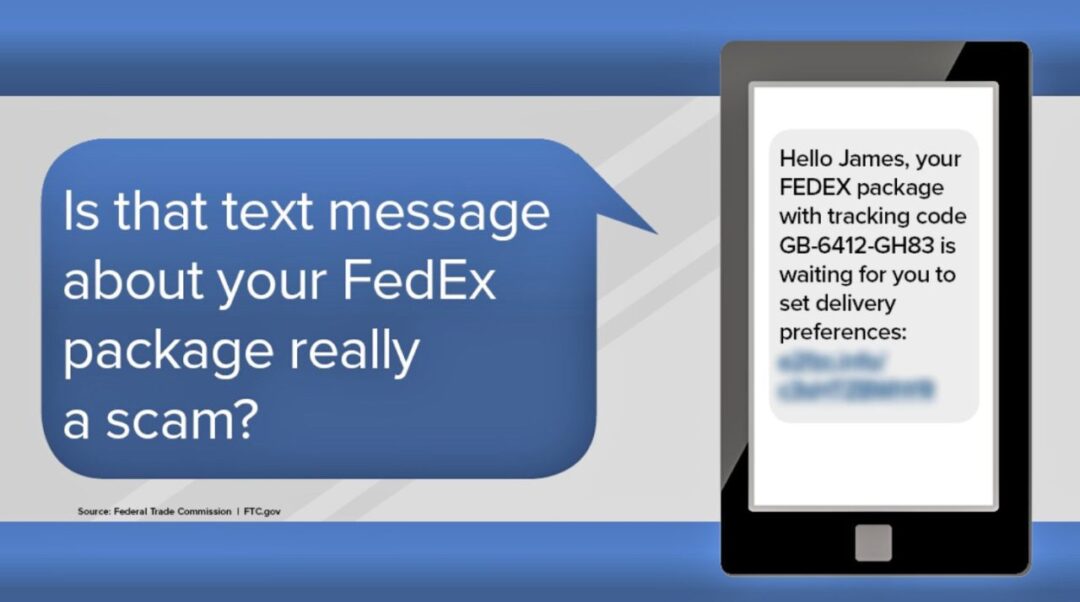
We’ve all gotten them – email or text messages telling us that a delivery cannot be made without additional information. You may be expecting a package from that company and may be tempted to respond with the requested information.
Don’t do it!
These fake messages are designed to trick you into giving the sender your personal information – perhaps your password, your account number or your Social Security number. They may suggest you click on a link, which will take you to a site asking for more personal information.
If you think a message might be real, do not respond to it. Instead, contact the company directly using a phone number or website you know is real. Always check the sender’s email address – these bogus messages will have strange addresses, not related to the supposed sender.
Phishing emails and text messages often tell a story to trick you into clicking on a link or opening an attachment.
The Federal Trade Commission says these scammers may say they have noticed some suspicious activity or log-in attempts. They may claim there is a problem with your account or your payment information. They may say you need to confirm some personal or financial information. They may include an invoice you don’t recognize. They may want you to click on a link to make a payment. They may offer a coupon for free stuff.
None of this is true and, in fact, clicking on a false link could load your phone or computer with malware.
If you get such a message, ask yourself if you have an account with the company supposedly sending the message. If not, delete the message. If you do, contact the company using a phone number or website you know is valid. And, when you do, report the phishing message to that company.
There are a number of other ways these “anglers” can try to trick you, according to Chase.com.
Artificial intelligence: Scammers will use AI to impersonate voices. They will call, using these cloned voices, and pretend to be desperate for money to get out of trouble or danger.
Be very careful with any calls from friends or family members asking for help. Hang up and call them back on a number you know to be theirs or call someone else who knows them.
Police and government scams: Scammers impersonate officials like police, the IRS or Social Security. They try to scare or intimidate you into sending money. They may use the names of real judges or deputies. The advice is to never trust a law enforcement, government, utility company or bank that contact you out of the blue, especially if they threaten you. Hang up and find a number for that organization and call them directly.
Social media: Scammers create ads on social media offering merchandise at great prices. They set up bogus websites that look like genuine retailers. They will collect personal information and ask you to pay with a digital payment platform like Zelle. Always type in a company’s website yourself and look to see if special sales or promo codes are offered there. When possible, use your credit or debit card to pay for online purchases; they offer protection features.
Property rental scams: Scammers pose as real estate agents and post fake listings, offering to sell or rent properties that do not exist. They often will pressure you to send a deposit to hold the property, saying there’s a lot of demand for it. Use a local real estate agent and ask to see the property in person.
Known company scam: Scammers pretend to be from a company you know and trust; that company’s number may even appear on your caller ID. They will call about a problem, such as fraud on your account that must be resolved immediately. Always be suspicious of legitimate-looking or -sounding calls, texts or emails from companies making these sorts of claims. Hang up; don’t click on any links in texts or emails. Call the company directly yourself and ask if there is a problem with your account.
Tech support: Scammers pretend to be tech support from a well-known company. They try to trick you into clicking on a link, claiming there is a problem with your computer like a virus or a billing issue. To fix it, you inadvertently give them remote access to your computer. Never click on virus alerts, even if they look legitimate. Instead, call your service provider.
And then there is “smishing.” You will get a text message with a web link that indicates a USPS delivery requires a response from you. Do not click on the link. The message is intended to lure the recipient into providing their personal or financial information. These scammers often attempt to disguise themselves as a government agency, bank or other company to lend legitimacy to their claims.
The Postal Service offers free tools to track packages but customers must provide a tracking number online. USPS will not send customers text messages or emails without them first requesting the service with a tracking number.
How can you protect yourself?
Protect your computer by using security software; set it to update automatically so it will deal with any new security threats.
Protect your cell phone by setting software to update automatically.
Protect your accounts by using multi-factor authentication.
You can report phishing emails to the Anti-Phishing Working Group at reportphishing@apwg.org. Forward phishing text messages to SPAM (7726). And report phishing attempts to the Federal Trade Commission at ReportFraud.ftc.gov.
During this holiday season, be cautious and protect yourself. Do not be lured into revealing your personal information to these scammers.





0 Comments